
How I Wrote the CV That Won Me $200K in PhD Funding
Why I'm writing this, and why AI won't get it right for you
A few years ago, I applied to PhD programs as an international student. I came out with fully funded offers from McMaster University, the University of Calgary and the University of Glasgow, worth around $200K in funding. Today I'm a final-year PhD candidate in Information Systems at McMaster.
The one document behind every one of those offers was my CV. It went with every email I sent to a professor and every application I submitted. In this article I'll walk you through that CV section by section: what goes in, in what order, how long each part should be, and the mistakes I see students make over and over.
You might wonder why anyone needs a guide like this as we head out of 2026 and into 2027. ChatGPT, Claude and the other large language models have become remarkably powerful. Ask one for an academic CV and you'll get something that looks reasonable in seconds.
But "reasonable" doesn't win funding. An academic CV lives or dies on small details. Four research interests, not seven. Three or four words per interest, not a sentence. Every section ordered newest first. A graduation date marked "(expected)" instead of "present." In my experience, these models don't hold all of those rules at once, and they don't know which ones a reviewer actually notices.
They also can't really judge how your page looks. The structure and visual look of a CV matter as much as the words on it. A professor skimming dozens of applications forms an impression before reading a single line.
So use AI to polish your wording if you like. But the skeleton, the order and the rules below are yours to get right. Here's exactly how I did it.
The CV, section by section
The sections below follow the exact order of my own CV. In about 99% of cases, this is the best order for an academic application. Some fields and degree levels have exceptions, but the overall shape should stay the same.
1. The header: who you are and how to reach you, nothing more
Your name goes at the very top, large and clear. Underneath it, put your department, your university and the university's address.
On the right side, add your personal links:
- GitHub, if you have one.
- LinkedIn. I didn't include mine back then because my profile wasn't ready. If I did it again, I'd definitely add it.
- Personal website, if you have one. This is where it belongs.
- Google Scholar, if you want to show your publications.
- ResearchGate or any other professional profile.
Then your phone number and email. That's it.
Don't add anything beyond this. I see students add their date of birth and all sorts of extra personal details. You don't need any of it. It looks unprofessional, and it works against you rather than for you.

2. Education
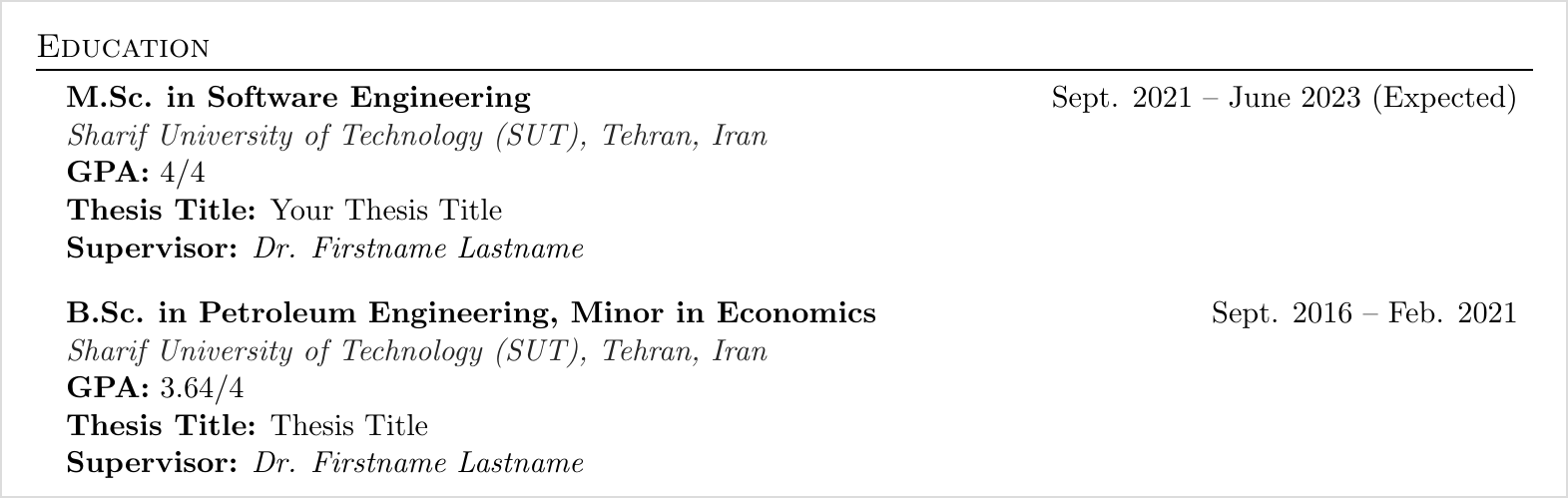
Your CV starts with Education. If you're doing a master's, list your master's and your bachelor's. If you're in your bachelor's, list only that. Don't add high school. I still see students do this, and there's no need for it.
If you're still studying, as I was, add your approximate graduation date followed by "(expected)." Nobody knows the exact date, but you should still give one. Many students leave this blank or write "present." Getting it right is a small detail that matters.
For each degree, include:
- Your field of study and university.
- Your GPA.
- Your thesis title, if you have one. If your program has no thesis, leave it out. If you're writing one but don't have a final title yet, an approximate working title is perfectly fine.
- Your supervisor's name. This must be there.
One thing I want to stress: you can change fields. My bachelor's was in Petroleum Engineering. My master's was in Software Engineering. Now I'm doing my PhD in a business school. Many advisors tell students they can't switch and must keep studying whatever they studied before. That belief is completely wrong. I've worked with many students who made the switch successfully. There are some subtle points to doing it well, and I'll cover them in a separate article.
3. Research Interests
This is where students make a lot of mistakes. Four bullet points is enough, five at most. I've seen CVs with six or seven, and that alone can get a CV rejected at first glance.
Each bullet should be three words, four at the very most. It shouldn't be too narrow or too broad. I've seen students list "Civil Engineering" as a research interest. That's a field, not a research interest, and it draws negative attention to your CV.
This is also the section you should adjust for each professor you email. Make small changes so your interests match theirs before you attach your CV. Personalizing your outreach isn't only about the email; it starts right here in your CV.

4. Research Experience
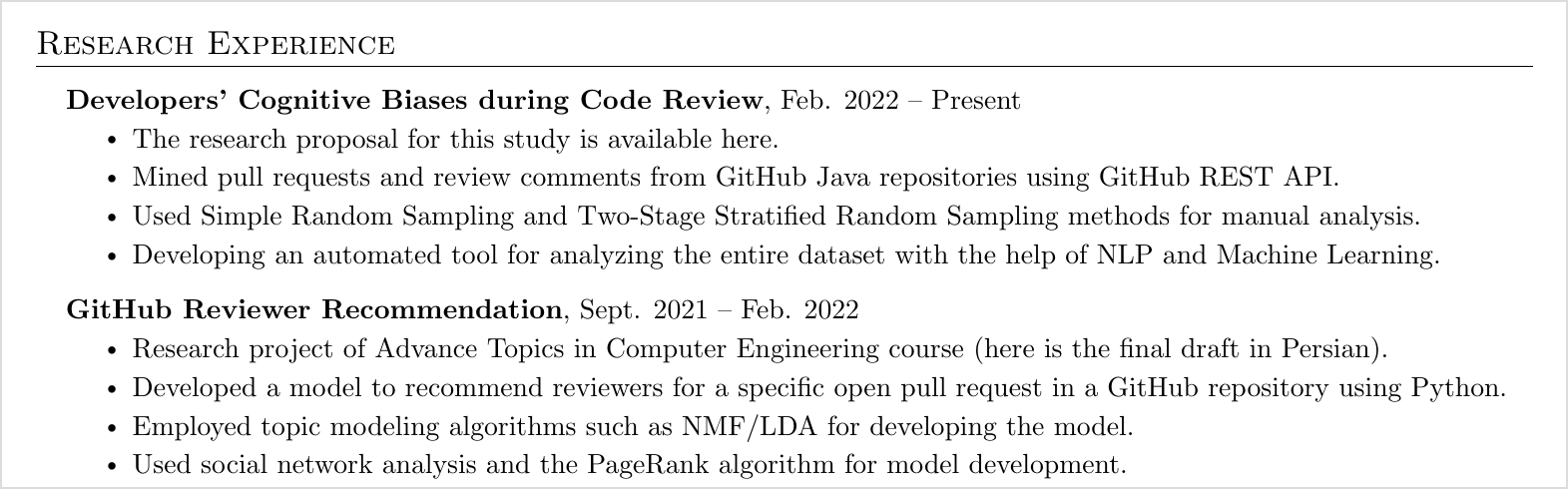
List your research experience in reverse chronological order: the most recent at the top, going back in time as you move down. This can include your master's thesis, your bachelor's thesis, or projects you did with other professors that were research in nature.
Keep the bullet points consistent across items, three or four each. Don't give one item two bullets and another seven. That looks unbalanced, and your CV should look polished at a glance.
Be specific. If you used a particular framework or research method, name it. Don't stay vague.
There's a real difference between research experience and academic projects, and there are ways to turn some academic projects into research experience so this section looks fuller. That's a topic of its own, which I'll cover separately.
5. Publications
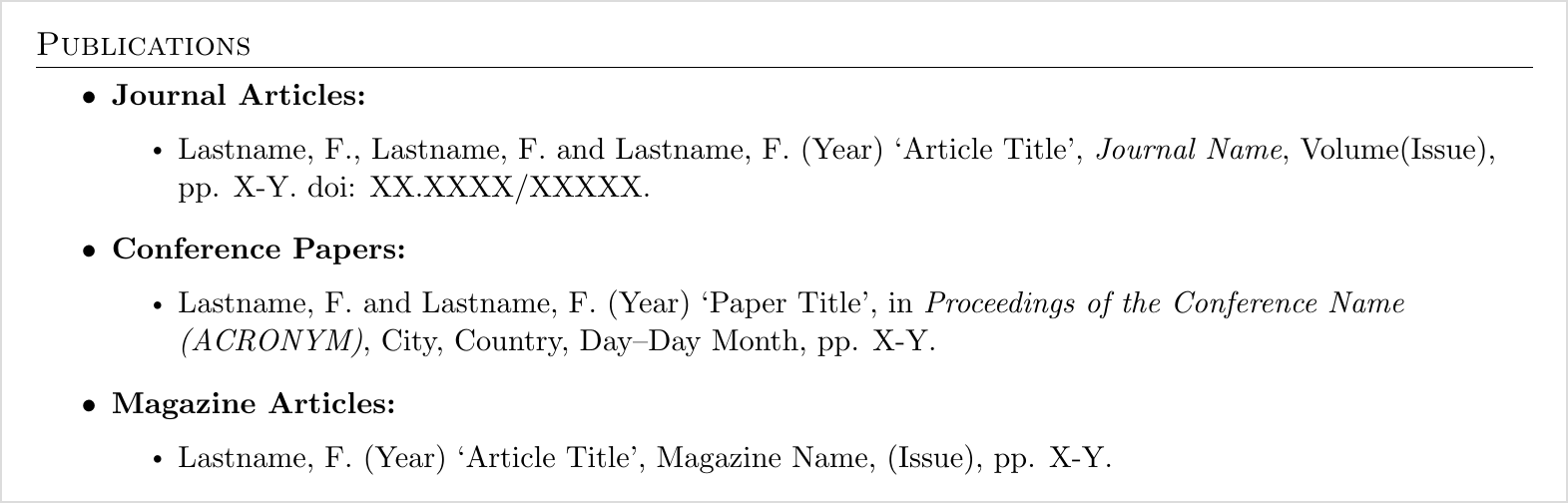
This section causes a lot of anxiety, and I hear a lot of wrong advice about it. Your publications don't have to be published, or even submitted, to appear on your CV.
The two papers on my CV weren't in prestigious venues. They weren't even at a well-known conference. And they were in petroleum engineering, which had nothing to do with what I was applying for. I included them for one reason: to show that I could get something published in English.
So please don't tell yourself, "I have no papers, so I can't apply, and no professor will take me." That's not true. If you can get something written in English somewhere, great, and even better if it's related to your target field. But don't stress about this section.
6. Academic Projects
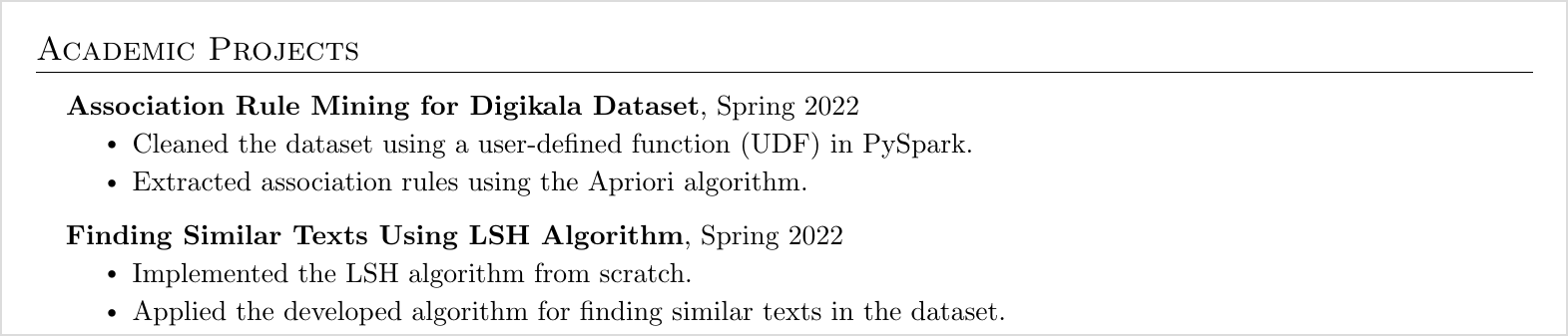
Academic projects and research experience overlap a lot. The more you can honestly put under research experience, the better. But don't force it. The person reviewing your CV can tell right away whether something deserves to be under research experience or belongs under academic projects.
Academic projects are the projects you did for your courses. During a bachelor's, for example, you often do a research-style project as part of your grade. Those fit perfectly here. As always, list them from the most recent backwards.
This newest-first rule applies to every section of your CV. The first item in each section should always be your most recent one.
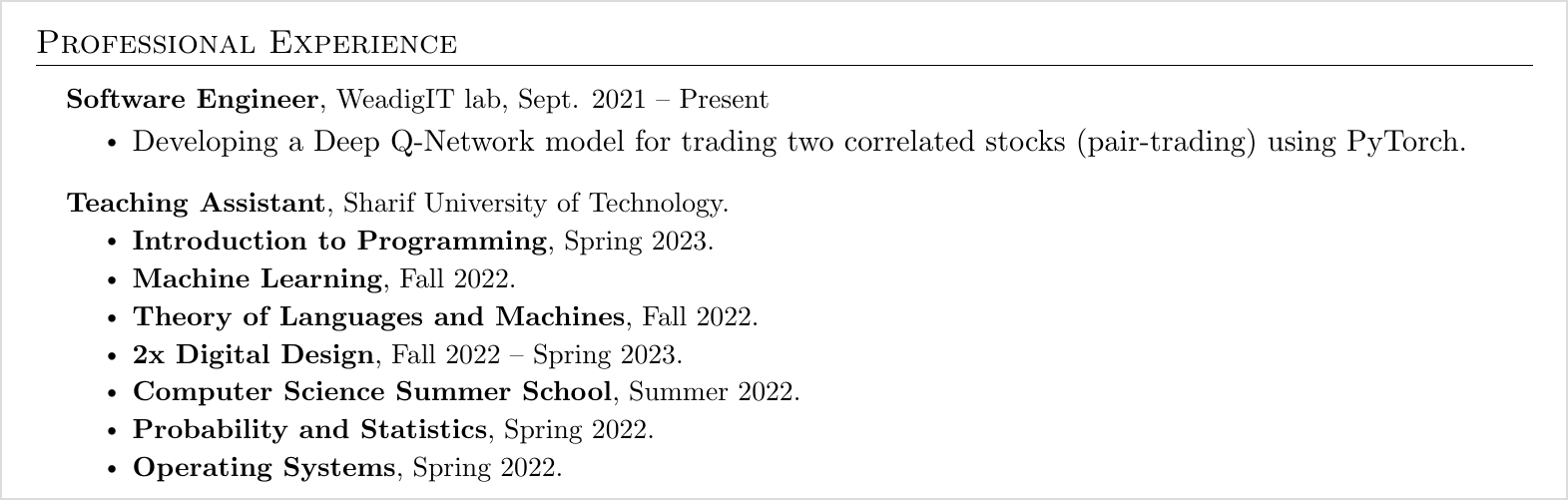
7. Professional Experience
If you worked in industry, outside the university, and the job is relevant to your CV, put it here. If you were a teaching assistant for a course, put that here too.
If you're a bachelor's student, don't worry if you've never been a TA. No one expects it. It's fine if this section is thin, but try to have something in it. If you were active in a university student association, list it, especially if you were president, vice president or on the executive team. This section is also a good place to show your soft skills.
One big mistake: I've seen many students put Professional Experience at the top of their CV. That's not the right move. You're applying for an academic position, and leading with your industry work doesn't help you. Keep it here, in this order.
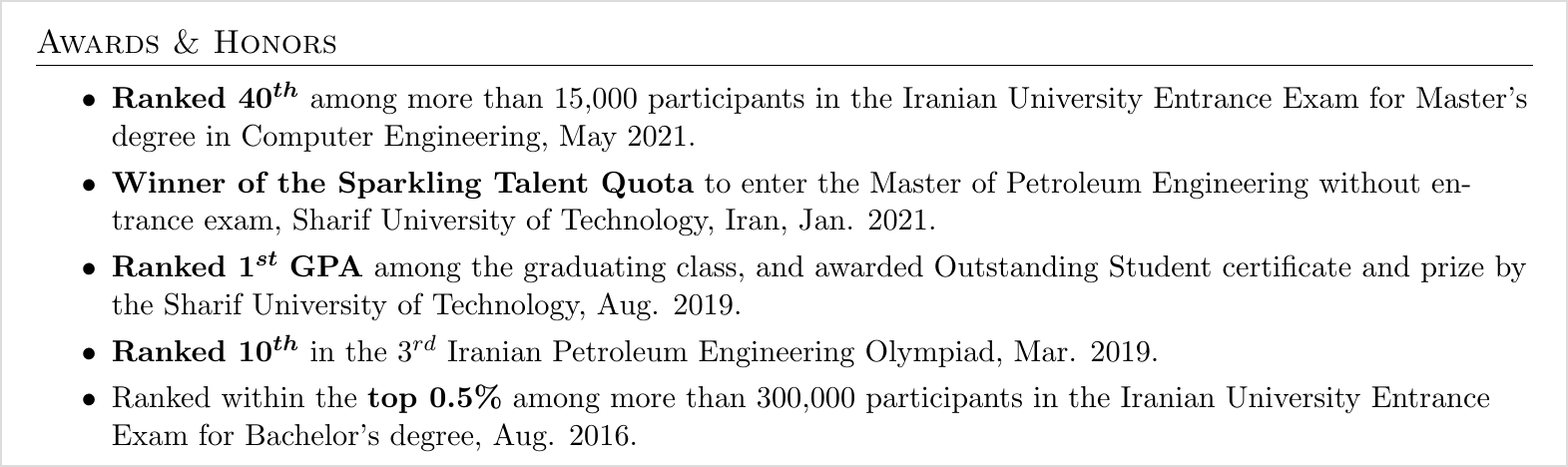
8. Honors and Awards
Again, list these from the most recent backwards. For most bachelor's students applying, this section usually holds the same few things:
- Your rank in your national university entrance exam.
- Your class ranking, if you were first, second or third by GPA.
One or two items is enough. Don't clutter this section or fill it with unrelated things.
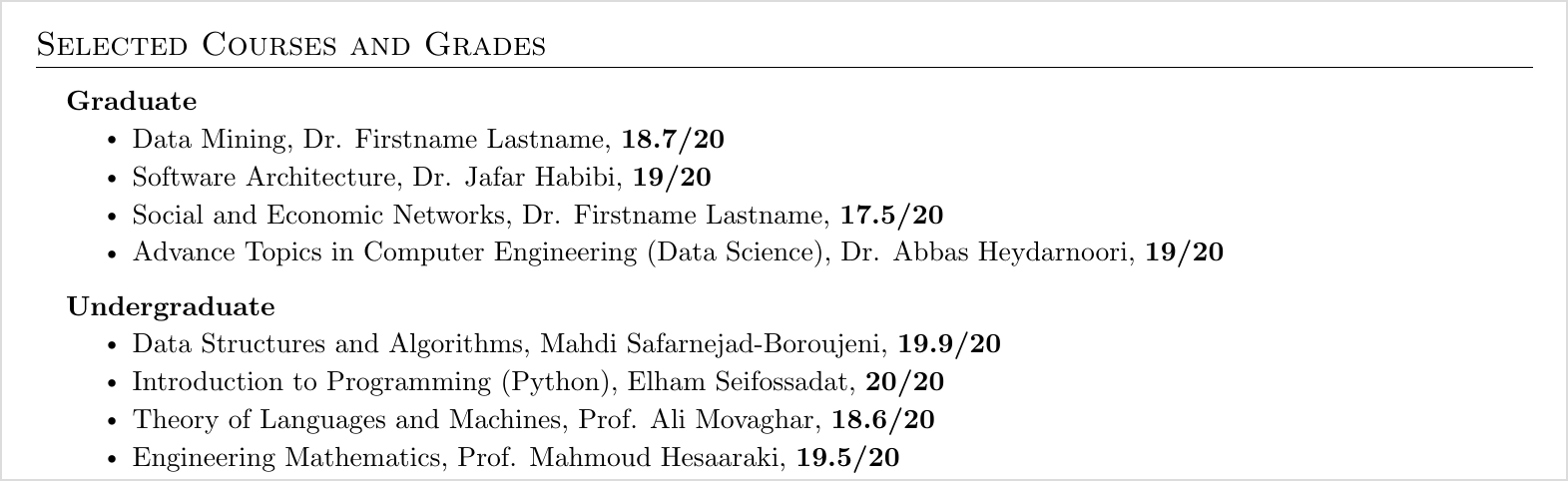
9. Selected Courses and Grades
This section matters, especially if you want to change fields or shift your research area. It's where you show the reader that you've already passed key courses in the field you're moving into, so you can handle its core material.
For each course, list the course name, the professor who taught it and your grade.
Include only courses related to the field you're applying to. If you're applying to Computer Science, don't list Strength of Materials from your bachelor's. As the name says, these are selected courses, not your full transcript. Four or five relevant courses is ideal.
10. Skills
List the programming languages you know, the frameworks you've used and any specific tools. If you're in a field like civil, mechanical or chemical engineering, there's a lot of specialized software. List all the software you know.
You don't need to be a 100% expert in something to list it. No one expects that. If you've used a tool or software in a project or in research, put it here. This section is a summary of what you can do technically.

11. Languages
If you've taken a language test, or you know other languages, mention them here. For test scores, you can show both your overall score and your sub-scores for each skill. If one sub-score is low, you can leave the breakdown out and show only the overall score. Adapt this to your own situation.
If you haven't taken a test yet, that's fine. You can leave it out, or if you have a rough plan, write "to be taken" with an expected date.

12. Hobbies
This is mostly a formality, and it doesn't carry much weight. If your CV runs past three pages, this is the section to cut. It does show that you're not just a bookworm and that you have other interests and activities in your daily life.

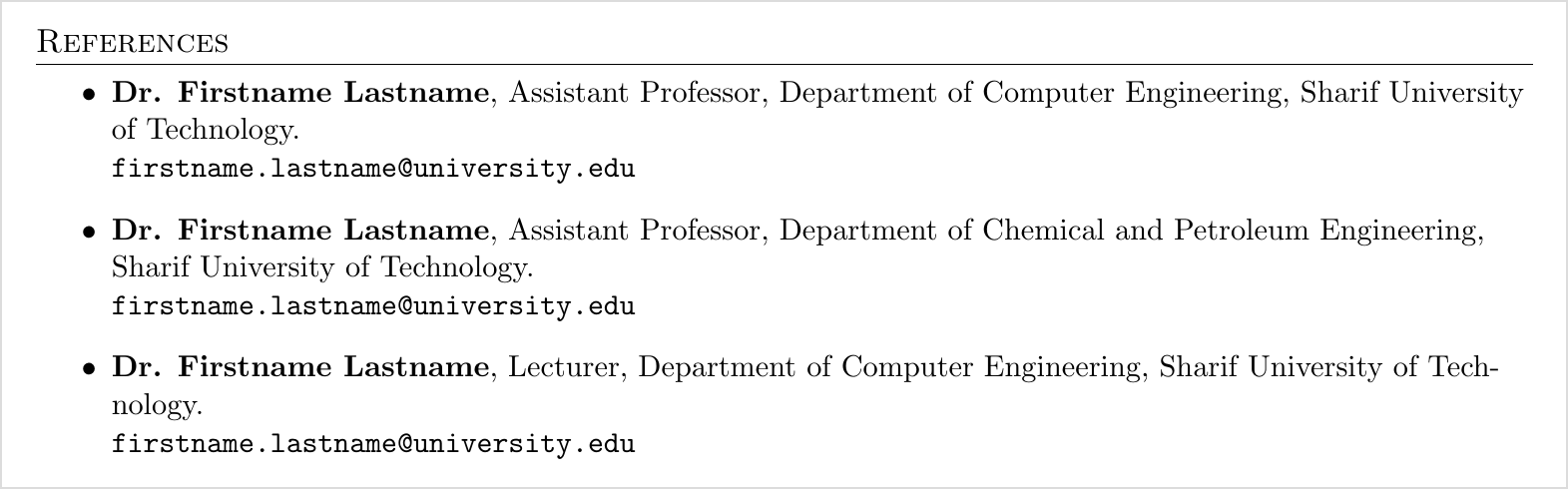
13. References
The last section, and an important one. Before you start applying, message your professors early. Tell them you're about to start your applications and ask whether they're willing to write you a recommendation letter, and how many they can send. Plan this at the very beginning of your application process.
Then list the professors who agreed here. Usually these are your supervisors. If you can't get a letter from your supervisor, it's not the end of the world. That's rare, but it happens. Generally, include your supervisors plus a professor whose course you did well in or whom you worked closely with.
It's rare for a professor to email your references before interviewing you. Still, every academic CV has this section, and yours should too. Unlike Hobbies, it's not one you can drop.
For each reference, list their name, their title, their department, their university and their email.
The structure and look: rules that apply to the whole CV
The content is only half of it. These are the rules for the shape of the page, and they're exactly the kind of details an AI-generated CV tends to miss.
Three pages, maximum. Never go over three pages, under any circumstances.
One CV for everywhere. Many students believe that applying to Europe needs a different CV with a photo, two columns and colors. That's a myth. Use the same clean, single-column academic CV for North America, for Europe and for anywhere else you apply academically.
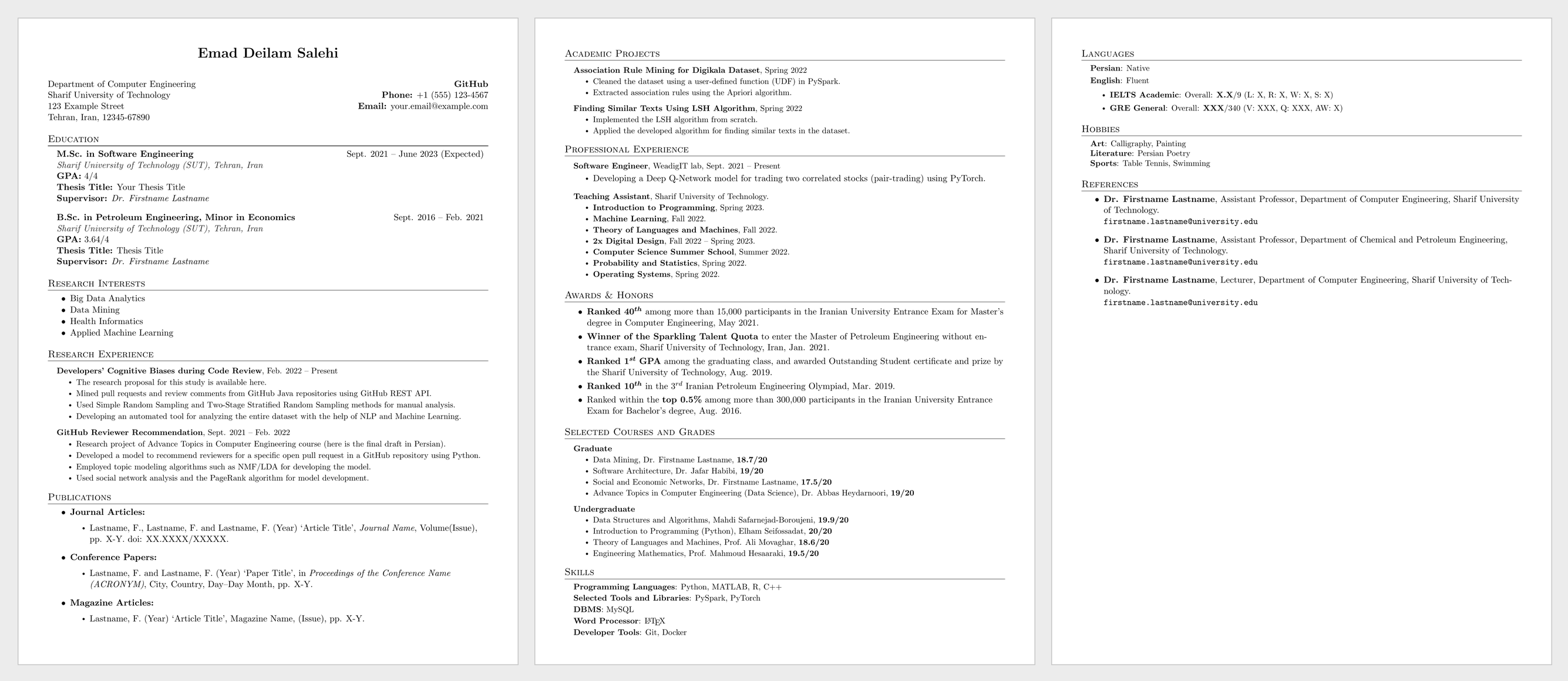
Newest first, in every section. The first item under each heading is your most recent one, and dates get older as you go down.
Consistent bullets. Give every item in a section the same weight, three or four bullets each. Uneven items make the page look careless.
Keep the order. Here's the full order again:
- Header
- Education
- Research Interests
- Research Experience
- Publications
- Academic Projects
- Professional Experience
- Honors and Awards
- Selected Courses and Grades
- Skills
- Languages
- Hobbies
- References
I built my CV in LaTeX, which makes it easy to keep spacing, fonts and alignment perfectly consistent from the first page to the last. If you'd like the template, leave a comment and I'll share it with you.
Final thoughts
None of these rules is complicated on its own. What makes a CV stand out is getting all of them right at the same time: the order, the length, the number of bullets, the dates, the details you leave out. That's the part no AI tool will reliably do for you, and it's the part reviewers notice first.
Your CV is what opens the conversation with a professor. Get it right, and everything else in your application gets a fair chance to be read.
If you'd like my LaTeX CV template, leave a comment and I'll share it. And tell me what you want next: how to switch fields, how to turn academic projects into research experience, or another part of the application process. I'll write about it.
Emad, Apex Apply